If enabled on your site and made available to your role, you can use Session Explorer to locate students who missed a section of a test. This report applies to TestNav-delivered assessments only.
1. Go to Operations > Session Explorer.
2. Filter the report to the desired student sessions.
3. Select Search.
4. Select the checkboxes for the student sessions to include in the export.
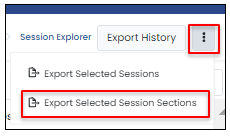
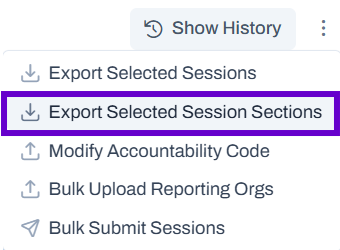
5. From the Actions menu on the top right, select Export Selected Session Sections.
Classic User Interface:
Updated User Interface:
6. Read the warning on the frequency of update and then select OK.
7. On the top right, select Export History.
8. Select the Download icon next to the desired report.
Tiny Link: https://support.assessment.pearson.com/x/JACyC